
What Is an MCP Server and Why Should You Care?
Part 2 of 2 — Building with AI Series
In Part 1, I walked through building a self-hosted URL shortener with Claude as my copilot — the Docker setup, the troubleshooting, the Cloudflare Tunnel. At the end of that post I mentioned something called an MCP server, which turned the whole thing from a useful tool into something you can actually have a conversation with.
This post is about that. What MCP is, why it matters, and what it looks like in practice — using a URL shortener as the example.
The Problem MCP Solves
AI assistants like Claude are incredibly capable in conversation, but they've historically had a core limitation: they can talk about your tools, but they can't actually use them. You could ask Claude to help you write a SQL query, but Claude couldn't reach into your database and run it. You could ask for help drafting a message, but Claude couldn't send it. The AI lived on one side of a wall, and your actual software lived on the other.
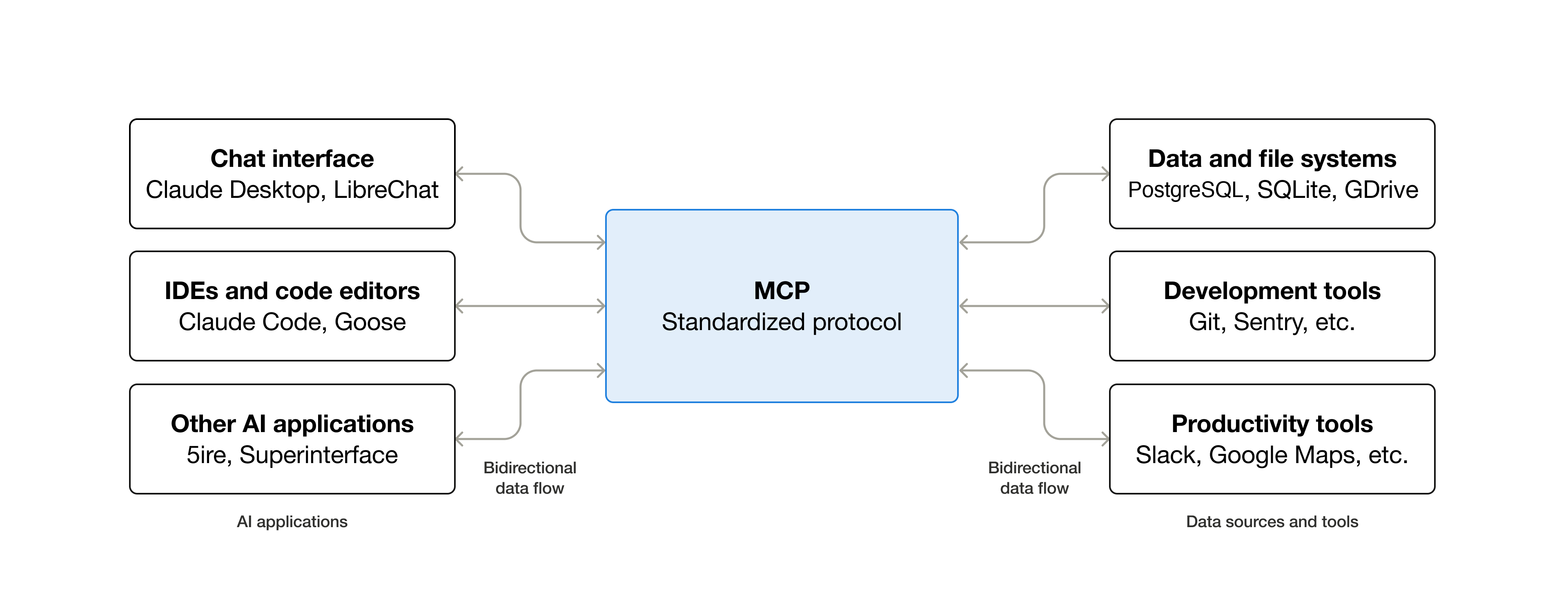
MCP — Model Context Protocol — is Anthropic's open standard for knocking down that wall. It defines a common language that lets AI models communicate with external tools and services in a structured, consistent way. Instead of every tool needing a custom integration, MCP gives developers a standard protocol to follow, and Claude knows how to speak it.
Think of it like USB. Before USB, every peripheral had its own connector and its own driver. After USB, you plug anything into anything and it just works. MCP is trying to be that — but for AI tools instead of hardware.
What an MCP Server Actually Is
An MCP server is a small program that sits between Claude and some external service. It exposes a set of "tools" — specific actions Claude is allowed to take — and handles the communication back and forth.
Each tool has a name, a description of what it does, and a defined set of inputs and outputs. Claude reads these tool definitions and uses them when they're relevant to what you're asking. You don't have to tell Claude to use a specific tool — Claude figures out which tool applies and uses it.
Here's a simple mental model: imagine you hired an assistant and handed them a laminated reference card listing everything they're allowed to do on your behalf. "You can shorten URLs. You can look up where a short URL points. You can check click stats." That card is essentially what an MCP server gives Claude.
A Concrete Example: YOURLS
YOURLS is the self-hosted URL shortener I set up in Part 1. It has a REST API that lets you create short links, expand them, check stats, and more. By itself, that API is useful — you can call it from scripts, browser extensions, or apps. But to use it you have to know the API exists, know the endpoint, and know how to format the request.
With an MCP server wrapping that API, the interface becomes this:
Me: "Can you shorten this Amazon link for me?"
Claude: [calls the shorten tool with the URL, gets back the short link] "Done — here's your link: https://chrishuerta.fyi/ankerbatterywithcable"
That's it. No API docs. No curl commands. No copying and pasting into a browser extension. I just talked to Claude the way I'd talk to a person, and Claude handled the rest.
The MCP server in this case is a small Node.js program from kesslerio on GitHub running in the background on my local machine. It knows my YOURLS instance's API endpoint and authentication token. When Claude needs to shorten a URL, it sends the request to the MCP server, the server calls the YOURLS API, gets the result, and hands it back to Claude, who then tells me.
What This Unlocks
The URL shortener example might sound simple, but it illustrates something important: the interface to any API can become a conversation.
Once you have an MCP server wired up, you're not limited to single-step actions. Claude can reason across multiple tool calls. "Create a short link for this URL with the slug 'blackfriday', then tell me how many clicks my last five links got" — Claude can handle all of that in one go, chaining the tools as needed.
And because Claude understands context, the interactions get smarter over time within a conversation. If you're in the middle of writing a blog post and you mention wanting to link to a product, Claude can shorten the URL right there in context without you having to switch apps or break your flow.
Local vs Remote MCP Servers
There are two flavors of MCP servers worth knowing about:
- Local MCP servers run on your own machine and connect to Claude Desktop. They're great for personal tools, home server integrations, and anything that doesn't need to be available from multiple devices. The YOURLS setup I built runs this way — a Node.js process on my Mac Mini that Claude Desktop talks to directly.
- Remote MCP servers are hosted somewhere publicly accessible and connect to claude.ai through a feature called Connectors. The advantage is that they work from any device — your phone, a different computer, anywhere you can open a browser. This is the direction the ecosystem is heading, and it's where things get really interesting for teams and shared workflows. The Craft MCP for Claude is a great example of a remote MCP server that I use everyday.
For my YOURLS setup, the upgrade path from local to remote would be hosting the MCP server on my home server behind a Cloudflare Tunnel — the same infrastructure I already built for YOURLS itself. At that point, I could shorten links from my phone just by messaging Claude.
The Broader Ecosystem
MCP isn't just for personal projects. Anthropic has published MCP servers for services like Google Drive, GitHub, Slack, and more. Third-party developers are building them for everything from databases to project management tools to home automation systems. The ecosystem is growing quickly.
What makes this different from previous AI integrations is the standardization. In the past, if you wanted Claude to interact with some service, you'd have to build a custom solution or wait for the AI company to build a native integration. With MCP, any developer can build a server for any service, and it works with any MCP-compatible AI client. The same server that works with Claude could work with other AI tools that adopt the protocol.
Why This Matters for Everyday Users
You don't have to be a developer to benefit from MCP — though it helps to understand what's possible. As more pre-built MCP servers become available, connecting Claude to your tools will become as simple as installing an app.
But even today, for anyone who runs their own services — home servers, self-hosted apps, custom APIs — MCP is a genuinely accessible way to add a conversational interface to things you've already built. The YOURLS MCP server I used was an open source project I found on GitHub, configured with a few environment variables, and had running in under an hour.
The mental model shift is the important part: your tools don't have to have a great UI to be usable. If they have an API — and most modern tools do — they can have a conversational interface. And a conversational interface you can use without breaking your flow is often better than a great UI you have to switch to.
Where Things Are Heading
The trajectory here is toward AI that doesn't just answer questions but actually operates within your digital environment — reading, writing, creating, managing, across whatever tools you use. MCP is the infrastructure layer that makes that possible without requiring every AI company and every tool vendor to build custom integrations with each other.
We're early. The developer experience is still rough in places, the ecosystem is still forming, and not everything works as smoothly as it eventually will. But the foundation is solid, and the direction is clear.
I started this project wanting a URL shortener. I ended up with a small glimpse of what it looks like when your tools can actually talk to each other — with you in the middle, in plain language, getting things done.
If you want to try this yourself, YOURLS is free and open source at yourls.org. The MCP server used in this post is available on GitHub. Part 1 of this series covers the full setup process.